Battle Birds Wiki
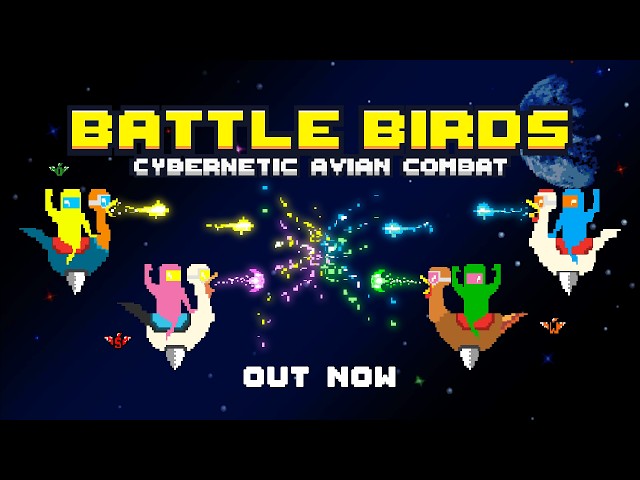
Battle Birds is a chaotic local multiplayer arcade shooter where up to four cybernetic birds flap, dash, and blast through hazardous arenas. Learn about all 7 arenas, 5 weapon power-ups, Score Attack, Time Attack, controls, CPU battles, achievements, and Steam features.
Battle Birds Resources
Eight focused guides that take you from your first flap to confident 4-player arena battles
Latest Updates
Discover the newest guides, tips, and content
Battle Birds Gameplay: Core Mechanics, Modes & Tips
Learn Battle Birds gameplay basics: flap and dash movement, 5 weapon power-ups, 7 arenas, 4-player local PvP, Score Attack and Time Attack tips.
Battle Birds Controller Support: Setup Guide & Tips
Learn how Battle Birds controller support works on Steam, how to connect up to 4 controllers for local multiplayer, plus keyboard alternatives.
Battle Birds Power Ups: All 5 Weapons Compared & Tips
Learn every Battle Birds power up: close, mid, long-range and explosive weapons, pickup priority, arena tactics, and tips for 1-4 player matches.
Battle Birds Keyboard Controls: Setup Guide & Keybind Tips
Learn Battle Birds keyboard controls: flap, dash, shooting, movement, menu navigation, and controller alternatives for local multiplayer matches.
Battle Birds Attack Abilities: Weapons, Moves & Combat Tips
Master Battle Birds attack abilities: flap, dash, shooting, and 5 weapon power-ups with tactical tips for arenas and local PvP matches.
Battle Birds Explosive Items: Timing, Hazards & Combo Tips
Learn how Battle Birds explosive items work: trigger timing, blast zones, hazard combos, arena positioning, and safe usage tips for local PvP.
Battle Birds How to Play: Beginner Setup & Combat Tips
Learn how to play Battle Birds, the 4-player local arcade shooter on Steam: controls, modes, arenas, weapon power-ups, and local multiplayer setup.
Battle Birds Steam: Full Game Overview & Setup Guide
Battle Birds on Steam is a 4-player local arcade shooter with 7 arenas, 5 weapon power-ups, and Score/Time Attack modes. Learn pricing, setup, and tips.
Battle Birds Worth It: Price, Content & Value Review 2026
Is Battle Birds worth it on Steam? Review the $6.99 price, 7 arenas, 5 weapon power-ups, local PvP for 4 players, and the free Demo before you buy.
Battle Birds Local Co-Op: Setup Guide & Multiplayer Tips
Learn how to set up Battle Birds local co-op with up to 4 players, controllers, CPU opponents, Remote Play Together, and winning couch tactics.
Battle Birds Steam App ID: Official Store Listing Explained
The Battle Birds Steam App ID is 3654490. Find the official store page, the separate Demo listing, pricing, features, and how to avoid look-alike games.
Battle Birds Beginner Guide: First 10 Matches Step-by-Step
Learn Battle Birds basics: flap and dash movement, shooting while airborne, weapon power-ups, arena hazards, and local multiplayer setup tips.
Battle Birds Beginner Guide
Battle Birds is built around fast aerial movement, precise shooting, and the ability to turn dangerous arena situations into opportunities. New players should first learn to stay airborne, then combine flap, dash, attacks, and explosive power-ups while watching the arena for hazards.
Learn to Flap and Stay Mobile
Use flap to control vertical movement and maintain a useful position in the air. Avoid hovering in one predictable location, because stationary movement makes it easier for opponents to line up attacks.
- Control altitude before attempting complex attacks
- Use short movement adjustments instead of holding one direction continuously
- Keep enough space around your bird to react to incoming threats
Add Dash to Your Movement
Dash is the main tool for quickly changing position, escaping pressure, and creating an opening for a counterattack. Practice using it both defensively and offensively.
- Dash away from direct attacks and dangerous areas
- Use a diagonal change of position to make pursuit more difficult
- Avoid spending dash only for travel when you may need it to escape
Practice Shooting While Moving
Once basic movement feels comfortable, combine aerial movement with shooting. The goal is to attack without giving up the ability to dodge or reposition.
- Fire while changing altitude or direction
- Use movement to maintain a favorable attack distance
- Prioritize controlled attacks over repeated firing without a plan
Recognize Dangerous Arena Zones
Arena hazards can punish careless movement and limit escape routes. Learn to identify dangerous areas before committing to a chase or retreat.
- Check the surrounding space before dashing
- Avoid forcing an opponent into a hazard if it exposes your own position
- Use safer areas to reset your movement and prepare the next attack
Use Explosive Power-Ups to Change the Fight
Explosive items can create immediate pressure and reshape the available space in the arena. Use them when an opponent is committed to a direction, trapped near a hazard, or trying to recover.
- Use explosive effects to deny space
- Combine an explosion with dash movement for a safer attack
- Do not use a powerful item without checking your own escape route
Follow a Simple Practice Route
Start by practicing flap movement, then add dash, followed by shooting and power-up usage. Repeat the sequence until movement and attacks feel natural rather than reactionary.
- Practice movement before attempting aggressive engagements
- Repeat short attack-and-retreat patterns
- Review mistakes caused by overcommitting to a chase
Quick Tips
- Stay airborne: altitude control is the strongest defensive tool in Battle Birds.
- Keep your dash ready for escapes instead of spending it on travel.
- Grab explosive power-ups only when you have a clear route out of the blast area.
- Short attack-and-retreat patterns beat long, predictable chases.
Battle Birds Controls and Movement
Battle Birds depends on movement rhythm as much as attack timing. Flap controls vertical positioning, dash creates sudden changes in momentum, and shooting is most effective when combined with constant repositioning. A controller is recommended because analog input can make small aerial adjustments easier to manage.
Flap
Adjust altitude and maintain aerial control
Movement: Use repeated, measured inputs to stay at a useful height instead of making large corrections at the last moment.
Practice: Hold a stable position while changing direction and observing the arena.
Directional Movement
Move horizontally and shape the angle of approach
Movement: Change direction regularly so your path is harder to predict, especially while lining up a shot.
Practice: Combine horizontal movement with small altitude changes.
Dash
Quickly reposition, evade attacks, or close distance
Movement: Save dash for moments that matter: avoiding a hit, escaping a hazard, or converting a safe opening into pressure.
Practice: Practice dashing across an opponent's attack line rather than moving directly toward danger.
Aim
Direct attacks toward an opponent or target area
Movement: Aim ahead of moving opponents and keep your movement active while tracking them.
Practice: Track a target while changing altitude and direction.
Shoot
Deal damage and pressure opponents
Movement: Fire during movement instead of stopping to attack. Use attack windows created by dash or arena positioning.
Practice: Practice short attack sequences followed by an immediate reposition.
Controller Movement
Provide fine analog control for aerial adjustments
Movement: Use the analog range for subtle direction changes and reserve stronger inputs for escapes or committed movement.
Practice: Compare small corrections with full directional inputs to build a consistent rhythm.
Battle Birds Weapons and Power-Ups
Weapon power-ups are not only damage upgrades; they influence how a player controls space and starts engagements. The best pickup depends on the current arena situation, the distance to the opponent, and whether the item can be used without giving up a safe retreat.
Close-Range Pressure
A close-range option is strongest when an opponent is nearby, committed to a direction, or recovering from a dash.
- The opponent is already within reliable attack distance
- You can approach without crossing a dangerous zone
- You have a clear route to disengage after attacking
Mid-Range Control
A mid-range option helps maintain pressure while preserving enough distance to react. It is useful for players who prefer to attack while circling or changing altitude.
- You want to keep an opponent away from a preferred position
- The arena provides room for lateral movement
- You need to attack without committing to a direct chase
Long-Range Punishment
A long-range option is suited to open sightlines and opponents who repeat predictable movement. It rewards patience and accurate positioning.
- There is enough open space to maintain visibility
- The opponent is moving along a readable path
- You can keep moving instead of standing still to line up attacks
Explosive Area Pressure
Explosive power-ups can affect more than a single attack line. They are useful for denying space, interrupting an approach, and forcing an opponent away from a safe route.
- The opponent is near a hazard or restricted space
- You need to interrupt a chase or defensive reset
- The explosion can limit movement without trapping you as well
Flexible Pickup Choice
The fifth weapon power-up should be evaluated by the current fight rather than by a fixed ranking. A flexible choice can be more valuable when it matches the arena, distance, and opponent behavior.
- Your current weapon does not match the engagement distance
- The pickup creates a safer attack pattern than your current option
- You can collect it without abandoning a strong defensive position
Basic Pickup Priority
Prioritize a power-up that improves your immediate survival or creates a clear attack opportunity. Do not leave a safe position solely to collect an item that does not fit the current engagement.
- The item supports your next planned action
- The route to the pickup is safer than the route to the opponent
- You can use the item immediately after collecting it
Battle Birds Arenas and Hazards
Arena awareness is a core part of Battle Birds combat. Hazards can limit movement, break pursuit routes, and punish players who dash without checking their surroundings. Treat every arena as a movement puzzle: identify open space, dangerous areas, escape routes, and positions where an opponent can be forced to react.
Arena 1: Learn the Open Routes
- Mechanic
- Use the first arena you learn to establish a basic movement rhythm.
- Safe Position
- Keep enough open space to flap, turn, and dash without immediately entering a hazard.
- Common Mistake
- Chasing in a straight line without checking the space behind the target.
- Route Tip
- Approach from an angle, attack briefly, and retreat through open air.
Arena 2: Watch the Boundaries
- Mechanic
- Arena boundaries can reduce the room available for evasive movement.
- Safe Position
- Stay near a route that allows a lateral escape rather than being pressed against an edge.
- Common Mistake
- Using dash only to move forward and losing the ability to escape from the boundary.
- Route Tip
- Reposition toward the center before committing to a long attack sequence.
Arena 3: Respect Hazard Zones
- Mechanic
- Dangerous areas can punish careless movement and make a direct pursuit unsafe.
- Safe Position
- Use the clear space outside the hazard to reset altitude and direction.
- Common Mistake
- Entering a dangerous zone while focused only on the opponent.
- Route Tip
- Force the opponent to approach the hazard instead of following them into it.
Arena 4: Protect Your Escape Route
- Mechanic
- A strong attack position is only useful if it still leaves room to disengage.
- Safe Position
- Keep one open route behind or beside your bird before firing.
- Common Mistake
- Using an explosive power-up with no room to move afterward.
- Route Tip
- Attack from the side of the arena that gives you the clearest retreat.
Arena 5: Use Vertical Space
- Mechanic
- Different heights can change attack angles and create safer ways to avoid pursuit.
- Safe Position
- Maintain enough vertical room to flap upward or drop away from a threat.
- Common Mistake
- Remaining at one altitude while the opponent adjusts their approach.
- Route Tip
- Change height before changing direction to make your movement less predictable.
Arena 6: Deny Narrow Approaches
- Mechanic
- Restricted routes make explosive effects and well-timed attacks more valuable.
- Safe Position
- Hold the wider side of the arena so you can react if the opponent changes direction.
- Common Mistake
- Entering a narrow route first and allowing the opponent to control the exit.
- Route Tip
- Use area pressure to discourage direct approaches and preserve your preferred route.
Arena 7: Combine Every Tool
- Mechanic
- The most demanding arena situations require coordinated flap, dash, shooting, and hazard awareness.
- Safe Position
- Choose a position that connects a safe zone with at least one reliable escape path.
- Common Mistake
- Treating movement, attacks, and hazards as separate problems.
- Route Tip
- Plan the full sequence: approach, attack, evade, collect or deploy a power-up, then reset.
Battle Birds Game Modes
Use local multiplayer or CPU battles for direct combat practice, then switch to Score Attack or Time Attack when you want a focused solo challenge. Each mode emphasizes a different part of the game loop, from adapting to opponents to improving speed and accuracy.
Local Multiplayer
1-4 local players
- Goal
- Battle other players in the same room using local multiplayer.
- Practice Value
- Best for learning matchups, reacting to human movement, and creating quick competitive rounds.
- Recommended For
- Friends, couch sessions, and informal tournaments.
CPU Battle
1 player versus CPU opponents
- Goal
- Fight computer-controlled opponents without needing additional local players.
- Practice Value
- Useful for learning controls, testing movement patterns, and preparing for multiplayer matches.
- Recommended For
- Solo warm-ups and players who want a structured battle without a full group.
Score Attack
Solo challenge
- Goal
- Earn the highest possible score by maintaining effective combat performance.
- Practice Value
- Encourages accurate attacks, efficient target selection, and consistent decision-making rather than simply surviving.
- Recommended For
- Players who enjoy leaderboard-style goals and repeatable performance improvement.
Time Attack
Solo challenge
- Goal
- Complete the challenge as quickly as possible.
- Practice Value
- Builds faster movement, sharper aiming, and more confident decisions under time pressure.
- Recommended For
- Players training for speed, execution, and short repeatable practice sessions.
Battle Birds Birds Guide
The Battle Birds roster centers on controllable cybernetic birds built for fast arcade combat. Compare their official designs, pick the bird whose handling matches your approach, and sharpen that handling across the arena modes.
Playable Cybernetic Birds
The game's controllable characters are cybernetic birds designed for avian combat. Review the official game presentation for the showcased roster and select the bird whose design and handling feel most natural.
Best for: Players comparing character identity before beginning a match.
Visual Identity
Each showcased bird contributes to the game's mechanical, futuristic visual style. Silhouette, armor, cybernetic parts, and color treatment make characters easy to recognize during a fast local match.
Best for: Players who want quick visual recognition during split-screen or party play.
Choosing a Playstyle
Choose a bird based on the handling and combat approach you want to practice. Movement control, aiming comfort, and familiarity are the strongest starting points for picking your main bird.
Best for: New players deciding which character to try first.
Battle Birds Local Multiplayer Guide
Battle Birds is designed for quick local competition, making it suitable for friends sharing one screen. Prepare the room, connect the available controllers, select the desired player arrangement, and use CPU opponents or Steam Remote Play Together when the group setup requires it.
Prepare the Shared Screen
Launch the PC version of Battle Birds on the computer connected to the display everyone will use. Make sure the screen, audio, and seating arrangement are comfortable for all players.
- Use a clear shared display.
- Leave enough room for players and controllers.
- Start the game before assigning players.
Connect and Test Controllers
Connect the controllers before entering the match setup. Test each device in the menus and confirm that every local player can navigate or join correctly.
- Connect controllers before the battle begins.
- Check which player is assigned to each device.
- Keep a keyboard and mouse available for menu navigation if needed.
Choose the Player Arrangement
Set up a match for the group size available, from a solo session to a four-player local battle. Add CPU opponents when you want a fuller match without requiring every slot to be controlled by a person.
- Select the intended local player count.
- Add CPU opponents when appropriate.
- Confirm that every human player has joined.
Select a Practice-Friendly Mode
Use CPU Battle for warm-ups and control practice, Local Multiplayer for direct competition, Score Attack for repeatable scoring goals, or Time Attack for short speed-focused rounds.
- Use CPU battles for first-time practice.
- Use local versus play for group competition.
- Use score or time challenges for individual improvement.
Use Steam Remote Play Together
When friends cannot share the same room, use Steam Remote Play Together where supported. The host should launch the game, invite participants through Steam, and confirm that remote inputs are recognized before starting the match.
- Have the host launch the game.
- Send the Steam Remote Play Together invitation.
- Test remote controls before beginning a serious match.
Battle Birds Demo and PC Requirements
The Demo and the full game are separate Steam listings. Start with the free Demo to test the core experience, then compare the full release information and the current Steam requirements before purchasing or organizing a local multiplayer session.
Free Demo
- Official Listing
- Battle Birds: Cybernetic Avian Combat Demo
- Access
- Free Steam Demo
- Use Case
- Try the game before purchasing the full release and confirm that the controls and presentation work well on the intended PC.
- Setup Tip
- Install the Demo from its dedicated Steam page.
Full Game
- Official Listing
- Battle Birds: Cybernetic Avian Combat
- Access
- Paid Steam release
- Use Case
- Access the complete commercial version listed by the developer.
- Setup Tip
- Confirm that the store page is the full-game listing before purchasing.
Platform and Input
- Official Listing
- Steam PC version
- Access
- PC through Steam
- Use Case
- Play solo or arrange local multiplayer with compatible input devices and supported Steam features.
- Setup Tip
- Connect and test controllers before starting a multiplayer session, especially with multiple devices or Steam Remote Play Together.
System Requirements
- Official Listing
- Minimum and recommended configurations
- Access
- See the requirements section on the full Steam listing
- Use Case
- Compare your operating system, processor, memory, graphics hardware, and storage with the official specifications.
- Setup Tip
- Use the current requirements section on each Steam listing before purchasing.